


Zum - Student Transportation
4.5466.00 Reviews
App Specs
- Version
- 3.0.10
- Updated On
- License
- Free
- Downloads
- 100,000+
- Developer
- Zum
- Categories
- Maps & Navigation
- Platform
- Android
Screenshots
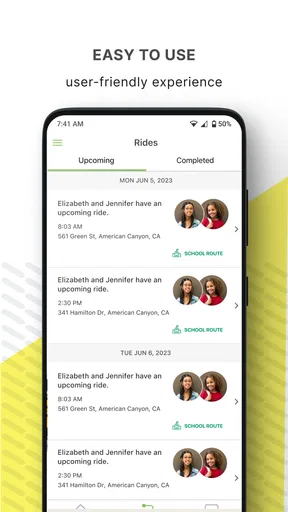
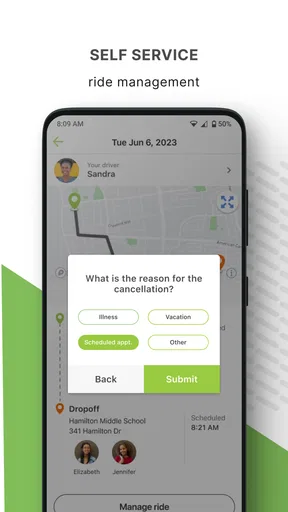
 Analysis by AppCompare
Getting a child to school on time is already a daily coordination job, and it becomes more complicated when several adults need the same ride information. Zum - Student Transportation is designed for that narrow but important task: helping families track and manage a child’s rides from a mobile device. I found it most useful as a shared point of reference for school transportation, rather than as a general navigation tool for every trip.
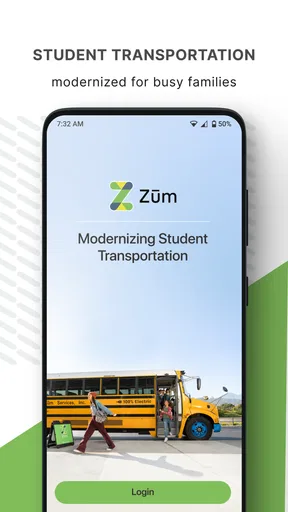
The app comes from Zum, a developer focused on student transportation, and it sits in the Maps & Navigation category. Its store summary is brief, but the practical idea is easy to understand: you use it to follow transportation connected with a child’s school journey. It is free, rated for Everyone, and the current release is version 3.0.10. The app has reached over one hundred thousand installs and holds a 4.6 average from around one thousand two hundred ratings, which suggests that many families find the basic purpose worthwhile.
Where the first problems usually appear
My first impression is that the biggest challenge is not learning a complicated interface. It is getting the right transportation information connected to the right family situation. A ride-tracking app is only useful when the child, route, school arrangement, and receiving adults line up correctly. If one of those details is wrong, the screen may look normal while still being unhelpful for the particular trip you are trying to follow.
This is why I would not begin by tapping through every available screen. I would first decide who needs access and what the app is expected to replace. For one household, it may be a way for a parent to check a child’s trip. For another, it may reduce messages between a parent, grandparent, and caregiver. Those are different workflows, even if they involve the same ride.
A common point of friction is expecting Zum - Student Transportation to behave like a general-purpose map. Google Maps, Apple Maps, or another navigation app is built around finding places and planning routes for the person holding the phone. Zum is more specialized: its value depends on transportation information associated with a student. If you open it expecting turn-by-turn driving directions for your own errands, you are judging it by the wrong standard.
Another likely stumbling block is timing. Families often check a ride only when they are already in a hurry. That makes it difficult to tell whether an issue is with the app, the ride information, the phone connection, or a change in the school’s transportation plan. I had a better experience treating the app as part of a routine: check the relevant trip before leaving, then use it again when the pickup or arrival window matters.
Setup checks that save time later
Before relying on the app for a morning departure, I would verify the child’s transportation arrangement through the school or transportation contact. The app cannot correct a mismatch in the underlying ride details. If a child has recently changed schools, pickup arrangements, or the adult meeting them after the ride, the most useful first step is confirming that the transportation record itself is current.
Worth Reading Before You Choose

EA SPORTS FC Mobile 26 Is a Bigger Football Game, but It Takes Time

Flipboard Shows What News Apps Must Do Beyond the Feed

Switching to Android Auto Means Rethinking Your Driving Routine

Google Calendar Makes a Crowded Week Easier to Manage

Ludo King Makes the Most of the Minutes Between Plans

Baby Panda World Brings Quick Play to Modern Phones, but Its Game Library Feels Busy
I would also make sure the phone is signed in to the intended family account rather than an account belonging to another household member. This sounds obvious, but shared devices and reused email addresses can make a transportation app appear empty or show the wrong context. If the ride is missing, I would check the account identity before reinstalling anything.
Keep the first setup deliberately simple. Add or confirm only the information needed for the immediate school journey, then test the workflow with the other adult who may need it. For example, a parent can check the ride while a grandparent confirms that they understand when to look and what action to take if the child is not where expected. This small rehearsal is more useful than assuming everyone will interpret the same screen in the same way.
It is also worth checking ordinary phone conditions before a school morning: the device should have a working internet connection, enough battery, and a current installation of the app. Zum - Student Transportation was released on February 12, 2016, and its current version is 3.0.10, so I would keep the app updated through the relevant app store rather than relying on an old installation. Updates can matter when a phone’s operating system changes or when an older session becomes unreliable.
The minimum operating system is iOS 9 or later. That makes the stated compatibility broad for supported Apple devices, but compatibility alone does not guarantee a smooth experience on every older phone. If the app opens slowly, closes unexpectedly, or displays stale information, I would first restart the device and confirm the connection before assuming the transportation record is wrong.
A practical family workflow
The most sensible daily workflow starts before the child is standing outside. I would open the app early enough to identify the relevant ride, confirm that the expected trip is visible, and then put the phone away until the timing becomes important. This avoids repeatedly refreshing in a rush and gives the family a chance to notice a problem while there is still time to contact the school or transportation provider.
Imagine a weekday morning in which one parent leaves for work before the child is collected. The parent can check the ride before leaving, while a grandparent remains responsible for the pickup point. Later, the parent can look again during a break rather than sending several messages asking whether the vehicle has arrived. In this situation, the app’s benefit is not merely seeing a map; it is reducing uncertainty between people who are sharing responsibility.
For afternoon rides, I would use a similar handoff. The adult meeting the child should know where to wait and what the plan is if the timing changes. The person monitoring the app should not be the only one who understands the arrangement. This is an important trade-off: digital tracking can reduce unnecessary calls, but it does not replace a clear backup plan or a responsible adult at the destination.
When something looks wrong, avoid making several changes at once. First note what is actually happening: is the ride absent, is the information old, or is the child simply not at the expected location? Then close and reopen the app, check the connection, and sign in again only if necessary. If the issue remains, contact the school or transportation contact with a concise description. That gives them something actionable instead of a vague report that “the app is broken.”
One useful habit is to separate an app problem from a schedule problem. If the ride appears but the timing does not match what the school communicated, the transportation record may need attention. If the ride cannot be viewed on one phone but is visible on another authorized device, the issue is more likely local to the first phone or account session. This simple comparison can prevent an unnecessary reinstall.
Recovering when the workflow breaks
If the app seems empty after opening it, I would work through the least disruptive checks first. Confirm the account, verify the internet connection, close and reopen the app, and make sure the phone is running a compatible operating system. If the problem began after a phone change, pay particular attention to whether the same account was used during setup.
If information appears frozen, compare the app with the real-world situation rather than repeatedly tapping refresh. Ask whether the ride itself has changed, whether a school schedule is different, or whether the phone has temporarily lost connectivity. A screen that has not changed does not automatically prove that the vehicle is delayed, and it does not automatically prove that the application has failed.
Reinstalling can be a reasonable later step, but I would not make it the first response on a school morning. Reinstallation may require signing in again, and that can create a second problem if the account details are not immediately available. I prefer to reserve it for a persistent app-level issue after checking the basics and confirming that the family can safely manage the current trip another way.
Families should also agree on a fallback communication method. Zum can be the main way to check a ride, but a phone call or direct message to the school or transportation contact may be more appropriate when the child is waiting and the information is unclear. The safest workflow treats the app as a helpful visibility tool, not as the only emergency channel.
Another practical tip is to avoid changing the family’s routine based on a single ambiguous update. If the app shows an unexpected situation, verify the child’s location and the school’s instructions before sending someone to a different pickup point. This is especially important when multiple children or caregivers are involved, because a change intended for one trip can easily be misunderstood as applying to another.
When the app is not the cause
Student transportation depends on more than software. Traffic, weather, school dismissal procedures, a driver’s route, a child missing the pickup point, or a last-minute administrative change can all affect what a family experiences. An app may accurately reflect the information available to it while the real-world situation is still changing.
This is where Zum - Student Transportation differs from ordinary map applications. A general map can help you find the school, estimate a driving route, or navigate around traffic, but it usually does not serve as the family’s student-ride reference. Zum is the better fit when the question is connected to a child’s arranged transportation. A conventional map is better when you are driving the child yourself or need directions to an unfamiliar location.
The distinction also matters for privacy and responsibility. I would not use a ride-tracking tool as a reason to stop supervising a young child’s pickup. Knowing that transportation is moving toward a destination does not remove the need for an adult to be ready at the correct place. The app can support coordination, but it cannot make a judgment about whether a particular handoff is safe.
It may also be the wrong choice for families who only need occasional directions. If your main need is finding a school, planning a personal commute, or comparing several travel options, a standard maps application will offer a broader set of tools. Zum’s focused purpose is an advantage for school transportation, but it also means it should not be treated as a replacement for every navigation service.
Likewise, families who do not have transportation information connected to the service may find little value in installing it. The app’s usefulness begins when it is part of an established student-ride arrangement. Without that connection, the interface cannot become a general trip planner simply because it belongs in the navigation category.
Who will get the most from it
I think the app is strongest for parents and caregivers who share responsibility for a child’s school rides and want fewer status-check messages. It is particularly practical when the adult who needs the information is not the person standing at the pickup location. In that situation, a central ride view can make the day easier to coordinate.
It is also a good match for households that prefer a focused tool instead of mixing school transportation with personal navigation, messaging, and calendar applications. The narrower purpose can make the daily task easier to remember: open the transportation app for the child’s ride, then use a regular map when you personally need directions.
I would be more cautious recommending it to someone who expects a complete family logistics platform. The app should not be chosen on the assumption that it will manage every school message, every caregiver schedule, or every driving task. Its value comes from the student-transportation workflow, and families should keep their other communication method available for exceptions.
The Everyone age rating also makes it broadly approachable from a store-classification standpoint. Still, the responsible user is the adult coordinating the ride, not the rating itself. I would set expectations with children and caregivers rather than handing over responsibility to the app’s notifications or status information.
My practical verdict
After looking at how it fits into an ordinary school day, I see Zum - Student Transportation as a specialized coordination tool rather than a full navigation replacement. Its best quality is focus: it addresses the uncertainty around a child’s arranged ride and gives families a shared place to check the journey. That can be genuinely valuable when several adults are involved.
The main friction is equally clear. The app depends on correct transportation records, the right account, a working connection, and a family routine that explains what to do with the information. If any of those pieces are missing, the experience can feel unreliable even when the software is functioning normally. My advice is to test it on a calm day, agree on a backup plan, and avoid waiting until pickup time to discover an account or setup problem.
Zum is free, and its strong 4.6 average across around one thousand two hundred ratings, together with more than one hundred thousand installs, makes it a reasonable app to try for families whose student transportation is supported by it. I would recommend it to caregivers who need ride visibility and shared coordination. I would skip it as a general-purpose map, and I would choose a conventional navigation app when the task is simply driving somewhere myself.
The best way to use Zum is as one part of a dependable handoff routine: check the ride, confirm the adult plan, and keep a direct backup contact ready. Used that way, it can remove a surprising amount of morning uncertainty without pretending to solve the parts of student transportation that belong to schools, drivers, and caregivers.
Pros
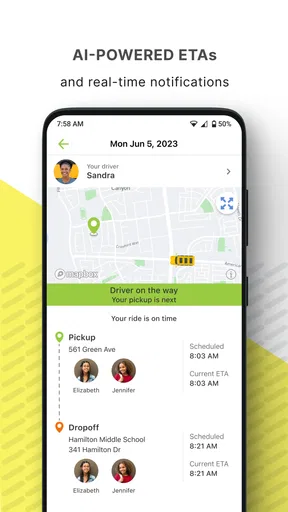
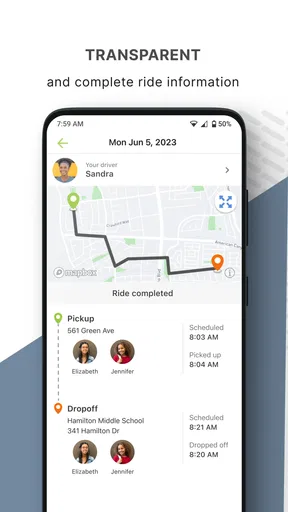
- Real-time bus tracking helps families monitor pickup and drop-off progress.
- Parents can receive timely alerts about delays
- route changes
- and arrivals.
- Digital student check-ins improve visibility throughout the school journey.
- Designed for school transportation
- with relevant tools for families and staff.
- Reduces uncertainty compared with relying only on printed bus schedules.
Cons
- Availability depends on the school or district using the Zum transportation system.
- Location updates may be delayed by weak cellular coverage or GPS issues.
- Requires account access and accurate student information to work properly.
- Notifications can become excessive if multiple alerts are enabled.
- Some features may vary depending on the district’s Zum service plan.
FAQs for Zum - Student Transportation
What is Zum – Student Transportation?
Zum – Student Transportation is a school transportation service app designed to help families manage rides to and from school. Depending on the participating school district, it may provide access to school buses, vans, or other approved vehicles, along with trip details, pickup information, and ride updates. Availability and features can vary by location and school partnership.
How do I use Zum to arrange or manage my child’s school transportation?
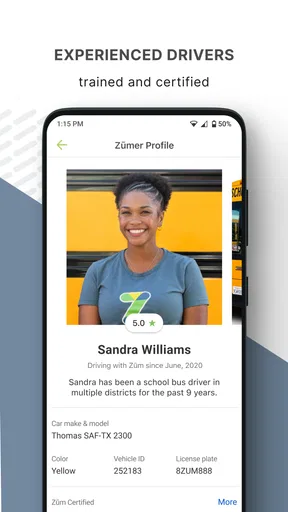
To use Zum, parents or guardians generally need to create an account through an eligible school or district and provide required student and contact information. After registration, the app may display assigned routes, pickup times, driver or vehicle details, and transportation schedules. Some options, such as changing a ride or reporting an absence, depend on the rules established by the school district.
Can I track my child’s Zum ride in real time?
In supported districts, Zum may offer ride tracking and notifications that help parents follow transportation progress. These updates can include estimated arrival times, pickup or drop-off alerts, and status changes. Tracking accuracy may depend on the vehicle’s location services, mobile connectivity, and the transportation features enabled by the school or district.
Is Zum – Student Transportation safe for children?
Zum is intended to support school-approved transportation and may include safety features such as verified drivers, trip monitoring, route information, and parent notifications. However, exact safety procedures differ between districts and service areas. Before relying on the app, parents should review their school’s transportation policies, authorized pickup requirements, emergency procedures, and driver communication options.
Is Zum available for every school and family?
No. Zum’s availability depends on whether your child’s school district or educational organization uses the service in your area. Even when the app can be downloaded, you may not be able to register or view transportation information without an invitation or an eligible student record. Check with your school or district to confirm participation and supported features.


